Wispr Flow promises to make you 4 times faster than typing — by turning your voice into clean, polished text in any app. But does it actually deliver in daily use? And is the free plan worth it for solopreneurs?
I tested Wispr Flow personally on Mac and iOS, using it daily for real work: client emails, content drafts, Slack messages, and Notion notes. Here’s my honest take — what works, what doesn’t, and who it’s actually for.
⚡ What does switching to voice dictation actually save you?
The average professional types around 60–80 words per minute. With Wispr Flow, you consistently reach 150–180 WPM — without losing quality.
Disclosure: This post contains affiliate links. If you choose to use them, we may earn a small commission at no extra cost to you.
→ Try Wispr Flow Pro free for 14 days
Table of Contents
Quick Verdict
Wispr Flow is the most complete AI dictation tool available right now. After a few days of daily use, something shifts: you stop thinking about typing. You just talk — and clean, formatted text appears exactly where you need it.
The free plan is real but limited (2,000 words/week on desktop, 1,000 on iOS). The 14-day Pro trial gives you full access to everything, including Command Mode — which is the feature that sets Wispr Flow apart from every other tool in this space.
It requires an internet connection, processes audio in the cloud, and has no offline mode. For most solopreneurs, those trade-offs are worth it. For users with strict privacy requirements or unreliable connectivity, they’re worth knowing upfront.
✅ Pros
- Works in every app, system-wide
- Best AI editing layer in the category
- Command Mode — voice-powered text editing
- Mac, Windows, iOS, Android
- Context-aware tone adaptation per app
- 100+ languages, automatic detection
- Privacy Mode included on all plans
- SOC 2 + HIPAA compliant
- $81M funded — strong long-term stability
⚠️ Cons
- Cloud-only — no offline mode
- Free plan limited (2,000 words/week desktop, 1,000 iOS)
- 6-minute recording cap per session
- No money-back guarantee (free trial only)
- Windows experience less polished than Mac
- Requires internet at all times
What is Wispr Flow?
Wispr Flow is an AI-powered voice dictation tool that converts your natural speech into clean, polished text — directly in any app on your device. You press a hotkey, speak naturally, and Wispr Flow types for you: with punctuation, no filler words, and context-adapted formatting.
It works system-wide on Mac, Windows, iOS, and Android. That means it’s active in Gmail, Notion, Slack, VS Code, WhatsApp, or any text field anywhere — no copy-pasting, no context switching, no separate editor to open.
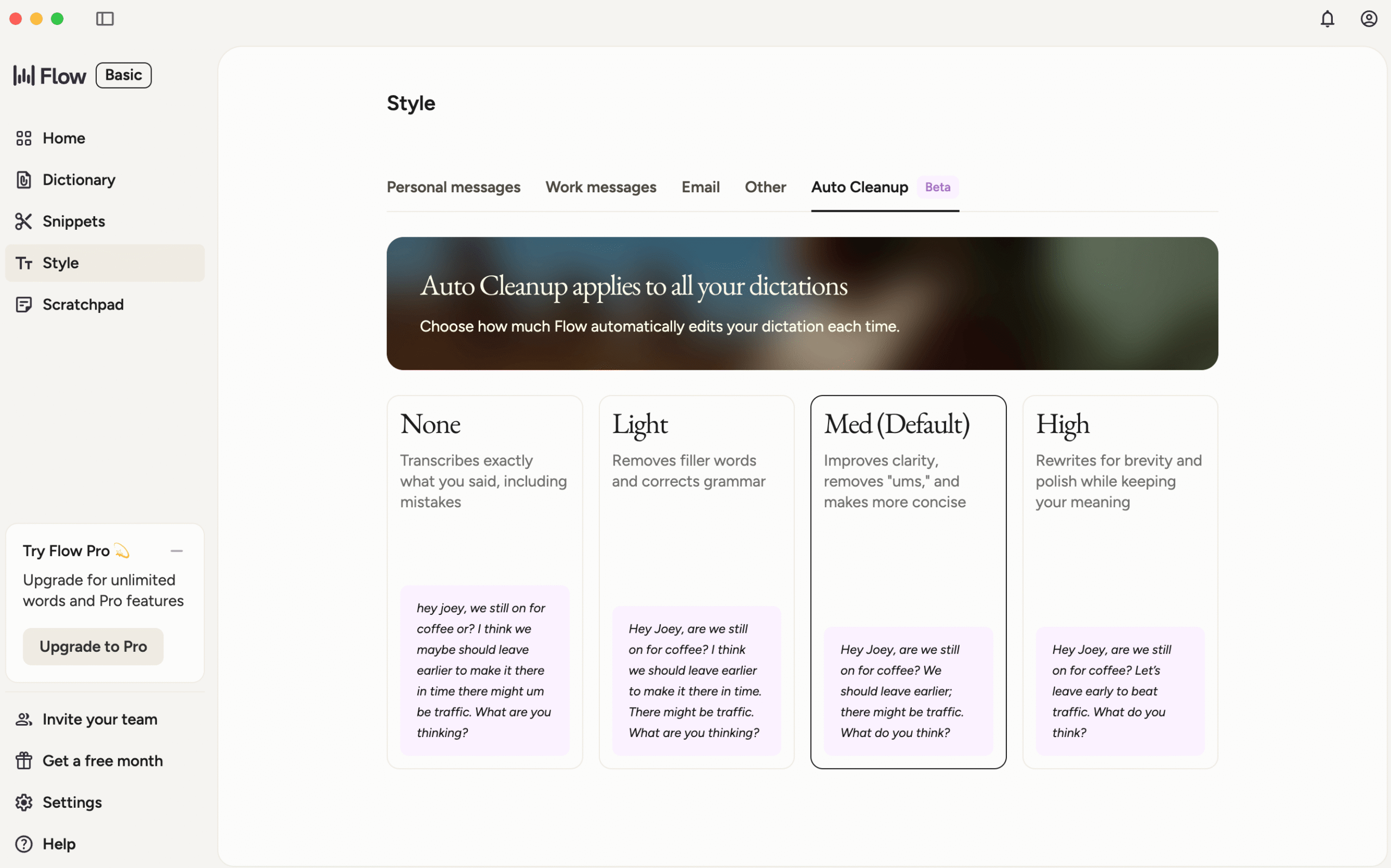
What makes it different from basic voice typing is what happens after transcription. Wispr Flow’s AI layer doesn’t just capture your words — it understands context. Dictate in Gmail and the output sounds like a professional email. Dictate in Slack and the tone shifts conversational. Same sentence, different register, automatically.
Under the hood, Wispr Flow uses a proprietary AI model — not OpenAI Whisper — with a fine-tuned Llama-based LLM layer for text enhancement. All processing is cloud-based via Baseten infrastructure. The company has raised $81M in funding, including a $30M Series A from Menlo Ventures, and holds SOC 2 Type II and ISO 27001 certifications.
Wispr Flow is the most feature-complete AI dictation tool available across all four major platforms. It’s the benchmark against which other tools are compared. For a full overview of free alternatives, see our guide to the best free AI dictation tools for solopreneurs.
Who is Wispr Flow for?
Wispr Flow is built for professionals who write a significant volume of text every day and want to replace their keyboard as their primary input method. More specifically:
- Solopreneurs and freelancers who produce daily written output — emails, proposals, client communication, content
- Content creators who want to draft faster without losing quality or tone
- Professionals working across multiple apps — the system-wide approach means it works everywhere without switching tools
- Users on Mac — where the experience is the most polished and feature-complete
👎 Who should probably look elsewhere
- Users who need fully offline dictation — Wispr Flow is cloud-only, always
- Users with strict data privacy requirements — even with Privacy Mode, audio is processed on cloud servers
- Users who only dictate occasionally — the free plan’s limits will feel tight, and the subscription may not be worth it
- Windows-first users — the experience is functional but noticeably less polished than on Mac
Key Features
🎙️ System-wide dictation
Works in any app on any platform. Press the hotkey, speak, release — text appears exactly where your cursor is. No switching apps, no copy-pasting.
🧠 Context-aware AI formatting
Wispr Flow detects which app you’re in and adapts automatically. Gmail gets professional prose. Slack gets conversational text. VS Code gets code-aware output.
✂️ AI filler word removal
Removes “um”, “uh”, “like” and mid-sentence restarts in real time. Also handles self-corrections — say “actually, let’s change that to Friday” and only “Friday” gets typed.
⚡ Command Mode
Highlight any text, speak a command, and the AI rewrites it in place. “Make this more concise”, “turn this into bullet points”, “rewrite this more formally” — no keyboard needed.
📚 Snippet library
Create voice shortcuts for phrases you use repeatedly. Say “send my calendar link” and your full Calendly URL appears instantly. Works for signatures, pricing, onboarding templates.
📖 Personal dictionary
Add your clients’ names, industry jargon, product names, and acronyms. Train it once and it stays consistent across every session and every device.
A note on Command Mode
Command Mode deserves more than a bullet point. It’s the feature that moves Wispr Flow from “good dictation tool” to “genuine writing assistant.” With it, you can:
- Select a paragraph and say “make this shorter” → it rewrites in place
- Highlight a sentence and say “make this sound more professional” → done
- Select a block of text and say “turn this into a numbered list” → formatted instantly
- Say “delete last sentence” without touching the keyboard
No other tool in this price range offers an equivalent. It’s the single biggest differentiator from tools like VoiceDash or Willow Voice.
Wispr Flow uses a proprietary speech recognition model — not OpenAI Whisper. The AI enhancement layer runs on fine-tuned Llama models via Baseten, giving Wispr full control over accuracy, latency, and output quality. The entire pipeline processes in under 700ms at the 99th percentile.
Real Use Case Test: Mac and iOS
I tested Wispr Flow across Mac and iOS over several weeks of daily use. Here’s what the time savings actually look like in practice.
On Mac
Setup is fast — download, install, grant accessibility permissions, and you’re dictating within minutes. The hotkey activation is reliable across every app I tested: Gmail, Notion, Slack, Chrome, and even inside form fields on websites.
The accuracy is noticeably better than basic voice typing. Speaking at a normal pace, with natural hesitations and mid-sentence adjustments, the output comes out clean and close to ready-to-send. Technical terms and proper nouns are handled well once added to the personal dictionary.
The context-aware formatting is the most impressive part in daily use. Dictating the same content into a Slack message vs. a client email produces genuinely different outputs — without any settings change. The AI picks up on the context and adjusts register automatically. In practice, it means less editing after the fact.
The snippet library delivers real time savings once configured. I set up triggers for my email signature, a standard introduction paragraph, and a pricing summary. Speaking a trigger phrase and seeing a full paragraph appear instantly is the kind of workflow change that becomes invisible — you just expect it to work, and it does.
📧 Client emails: a 400-word follow-up that used to take 10 minutes takes under 2 minutes with Wispr Flow.
✍️ Content drafts: speaking a first draft is faster than staring at a blank page — the structure is already there when you edit.
💬 Slack threads: a back-and-forth that takes 5 minutes of typing becomes a 45-second voice interaction.
📋 Notion notes: capturing meeting summaries and task briefs without switching from the keyboard shortcut.
On iOS
Wispr Flow on iOS works as a third-party keyboard, which means you can use it in any app by switching to the Wispr keyboard. The experience is slightly more friction than on desktop — you need to switch keyboards rather than just pressing a hotkey — but it works reliably for short to medium dictations.
The free plan on iOS is limited to 1,000 words/week (vs. 2,000 on desktop), which runs out quickly with daily use. For on-the-go capture of emails and quick notes, it’s functional. For extended content creation, you’ll want the Pro plan.
Accuracy held up well in quiet environments. In noisier settings — commuting, public spaces — quality dropped, which is expected behavior for cloud-based transcription and not specific to Wispr Flow.
Where it shows its limits
The 6-minute recording cap per session is the most disruptive limitation for heavy users. If you’re dictating a long email or a content draft, you have to stop, re-trigger, and continue. It breaks the flow for longer pieces. Wispr Flow’s own documentation acknowledges this as a current architectural constraint.
The free plan limits are genuinely restrictive for daily use. 2,000 words/week on desktop sounds like a lot until you use it — most active writers exhaust it within 2–3 sessions. The 14-day Pro trial is the right way to evaluate the tool at full capacity.
The Windows experience is functional but noticeably less polished than Mac. Some users report occasional freezes and hotkey conflicts. If you’re primarily on Windows, it’s worth testing carefully during the trial period.
Wispr Flow processes all audio on cloud servers — there is no on-device mode. Privacy Mode (available on all plans including free) sets zero data retention: no audio, transcripts, or edits are stored after processing. The company holds SOC 2 Type II and ISO 27001 certifications. For users who need absolute architectural privacy (audio that never leaves the device), an on-device tool like MacWhisper is the alternative.
Wispr Flow delivers on its core promise. The AI editing layer is the best in class, Command Mode is genuinely useful, and the context-aware formatting saves real editing time. The free plan is a real evaluation tier — use it hard during the 14-day Pro trial to make an informed decision.
Pricing
Wispr Flow Pricing — no commitment, cancel anytime
14-day free trial of Pro included for all new accounts. No credit card required. Referred users get 30 days. Student and nonprofit discount: 50% off Pro. No money-back guarantee — free trial is the evaluation window.
Is the free plan worth it?
The free plan is a real, usable tier — not just a crippled demo. You get the same AI editing quality as Pro, just with a weekly word cap. The custom dictionary, snippets, Privacy Mode, and 100+ language support are all included at no cost.
The limitation is volume. 2,000 words/week on desktop (roughly 15–20 minutes of dictation) runs out fast for daily users. Most solopreneurs hit the ceiling within 2–3 working days. Think of it as an extended evaluation tier rather than a sustainable free plan for daily use.
Is the Pro plan worth it?
At $12/month billed annually, the ROI case is straightforward. If dictation saves you 30 minutes per day — conservative for daily writers — that’s $12/month covered within the first working day of each month. The time savings compound quickly.
The honest caveat: Wispr Flow does not offer a money-back guarantee. Refunds are only provided when legally required. The 14-day Pro trial is your evaluation window — use it fully before deciding.
Wispr Flow vs Alternatives
| Tool | Free plan | Paid plan | Platforms | Command Mode | Offline |
|---|---|---|---|---|---|
| Wispr Flow This review | 2,000 words/wk desktop · 1,000 iOS | $12/mo annual | Mac, Win, iOS, Android | ✓ | ✗ |
| VoiceDash | 1,000 words/mo | $12/mo annual | Mac, Win, iOS, Android | ✗ | ✗ |
| Willow Voice | 2,000 words/wk | $12/mo annual | Mac, Win, iOS | ✗ | Optional |
| Apple Dictation | Unlimited | Free | macOS, iOS | ✗ | ✓ |
| MacWhisper | Limited | One-time | Mac | ✗ | ✓ |
📖 Also worth reading
Best Free AI Dictation Tools for Solopreneurs — Tested and Ranked →
Wispr Flow vs VoiceDash
This is the most relevant comparison for budget-conscious solopreneurs. Both tools are at the same price point ($12/month annual), both work system-wide across all major platforms, and both deliver solid AI cleanup.
The key difference: Wispr Flow has Command Mode, a more mature proprietary AI model, and context-aware formatting that adapts automatically per app. VoiceDash doesn’t have Command Mode but offers a more flexible custom prompt system (up to 3,000 words) and a slightly more privacy-transparent architecture via OpenAI Whisper.
If you need voice-powered text editing and the most polished experience, Wispr Flow is the stronger choice at the same price. If you want solid core dictation without needing Command Mode, VoiceDash is a capable alternative worth considering.
We’re working on a detailed head-to-head: [VoiceDash vs Wispr Flow — full comparison]. We’ll update this link when it’s live.
Wispr Flow vs Willow Voice
Willow Voice and Wispr Flow are close in pricing and free plan limits. Both offer system-wide dictation with AI cleanup. Key differences: Willow Voice has a slightly simpler onboarding, SOC 2 + HIPAA compliance built in from day one, and an optional offline mode. Wispr Flow has Command Mode, broader platform support (including Android), and more advanced context-aware formatting. At the same price, Wispr Flow offers more for power users; Willow is a good starting point for users who prioritize simplicity.
Wispr Flow vs Apple Dictation
Apple Dictation is free and unlimited, but stops after 30 seconds of continuous speech, has no filler word removal, and offers no AI editing layer. Wispr Flow removes every one of those limitations — at the cost of a subscription and an internet connection requirement. The gap in daily-use experience is significant enough that most solopreneurs who try both don’t go back.
Final Verdict
Wispr Flow earns its position as the best AI dictation tool for solopreneurs. The combination of system-wide coverage across all platforms, context-aware formatting, and Command Mode creates an experience that genuinely shifts how you interact with text. After a week of daily use, reaching for the keyboard starts to feel like the slower option.
The limitations are real and worth naming: no offline mode, a 6-minute session cap, restrictive free plan limits, and a Windows experience that’s less polished than Mac. These aren’t dealbreakers for most users, but they’re relevant depending on your workflow.
The 14-day Pro trial is the right way to evaluate it. Use it fully — Command Mode especially — before deciding. That’s where the tool earns its price.
- Ease of use: 9/10
- Transcription accuracy: 9/10
- Features: 9.5/10
- Value for money: 8.5/10
Wispr Flow is the right choice if you write daily, work across multiple apps and platforms, and want the most complete AI dictation experience available. Command Mode alone makes it worth the upgrade from the free plan once you’re using it regularly.
If you need fully offline dictation or strict on-device privacy, look at MacWhisper or Apple Dictation. If you want solid core dictation without the subscription cost, VoiceDash is a capable alternative at the same price point — without Command Mode, but with a more transparent privacy architecture. See our full dictation tools comparison for the complete picture.
Ready to try Wispr Flow?
Start with the 14-day free trial of Pro — no credit card required. Use Command Mode. That’s where it clicks.
→ Try Wispr Flow free for 14 daysFAQ
Is Wispr Flow free?
Yes. Wispr Flow has a free Basic plan with 2,000 words/week on Mac and Windows, and 1,000 words/week on iOS. All new accounts also get a 14-day free trial of Pro — no credit card required. After the trial, you return to the Basic plan unless you upgrade.
What platforms does Wispr Flow support?
Wispr Flow is available on Mac, Windows, iOS, and Android. One Pro subscription covers all platforms. Mac is the most feature-complete; Windows is functional but less polished. The iOS app works as a third-party keyboard in any app.
What transcription engine does Wispr Flow use?
Wispr Flow uses a proprietary speech recognition model — not OpenAI Whisper. The AI enhancement layer runs on fine-tuned Llama models via Baseten infrastructure. The full pipeline processes in under 700ms at the 99th percentile.
Does Wispr Flow work offline?
No. Wispr Flow is cloud-only and requires an internet connection for all dictation. There is no on-device processing mode. If offline dictation is a hard requirement, MacWhisper or Apple Dictation are the alternatives to consider.
Is my voice data stored by Wispr Flow?
With Privacy Mode enabled (available on all plans including free), Wispr Flow retains zero data after processing — no audio, transcripts, or edits are stored. Privacy Mode is available on Mac, Windows, and iOS. The company holds SOC 2 Type II and ISO 27001 certifications, and HIPAA BAA signing is available in-app on all plans.
What is Command Mode?
Command Mode is a Pro feature that lets you edit text using your voice. You select any text, then speak a command — “make this more concise”, “turn this into a list”, “rewrite this more formally” — and the AI rewrites it in place. It’s one of the most useful features in the tool and the main differentiator from competing dictation apps.
Does Wispr Flow have a money-back guarantee?
No. Wispr Flow does not offer a standard money-back guarantee. Refunds are only provided when legally required. The 14-day Pro trial (no credit card required) is the evaluation window — use it fully before subscribing.
How does Wispr Flow compare to VoiceDash?
Both tools are at the same price point and work across all major platforms. Wispr Flow has Command Mode, a proprietary AI model, and context-aware formatting. VoiceDash uses OpenAI Whisper, has a more flexible custom prompt system, and no Command Mode. For a detailed comparison, see our [VoiceDash vs Wispr Flow full comparison].
Is Wispr Flow worth it for solopreneurs?
Yes, for solopreneurs who write daily. The time savings are real and measurable — most users report 2–3x faster output for email and content tasks. At $12/month, it pays for itself quickly if you use it regularly. The 14-day trial lets you verify this for your own workflow before committing.