
Wisewand is an AI platform that researches, writes and publishes SEO articles for you. You give it a keyword, it analyzes the pages already ranking, drafts a structured article with images, and can publish it to WordPress, Shopify, WooCommerce or PrestaShop. Plans start at €67 per month for 30 articles (excluding VAT). It makes sense if you publish regularly. If you write a few posts a quarter, the subscription is hard to justify.
I’ve used Wisewand for real content production, including affiliate-oriented articles. This review covers how the workflow runs, what each feature does, what an article actually costs, where the tool falls short and who should skip it.
Editorial disclosure: This article contains affiliate links. Solo Finds may earn a commission if you purchase through them, at no extra cost to you. My recommendations are based on editorial evaluation, not commission rates.
Black Friday: 25% off Wisewand
Wisewand is running a Black Friday offer: 25% off on all plans, monthly or yearly, and on extra credits. Enter the code below at checkout. Wisewand says the discount is for life, and the offer runs until December 1.
BLACKFRIDAY
Check the conditions on the Wisewand site before you subscribe. Promotions can change or end without notice.
Quick verdict: is Wisewand worth it?
Short answer: yes, if you publish SEO or affiliate content on a regular schedule and want to cut the time spent on research, outlines, formatting and publishing. No, if you only publish now and then and a general AI assistant already covers your needs.
Where it stands out: one credit buys one finished article, Autopilot is included in every plan, and the whole chain from keyword research to publishing sits in one place.
The catch: it’s a recurring subscription, and every draft still needs a human check before it goes live.
- One credit is one article, so budgeting is simple.
- Credits roll over month to month with no expiry date.
- Writes from an analysis of the pages already ranking.
- Editable outline before writing starts.
- Autopilot included in every plan.
- Dedicated formats for affiliate pages, reviews and comparisons.
- More than 100 languages, with country targeting.
- Recurring cost, hard to justify for occasional publishers.
- Drafts still need fact-checking and editing.
- Starter covers a single site.
- Native publishing is limited to WordPress, Shopify, WooCommerce and PrestaShop.
- Autopilot output is capped by plan (one article a day on Starter).
- No guaranteed rankings or AI citations.
What is Wisewand?
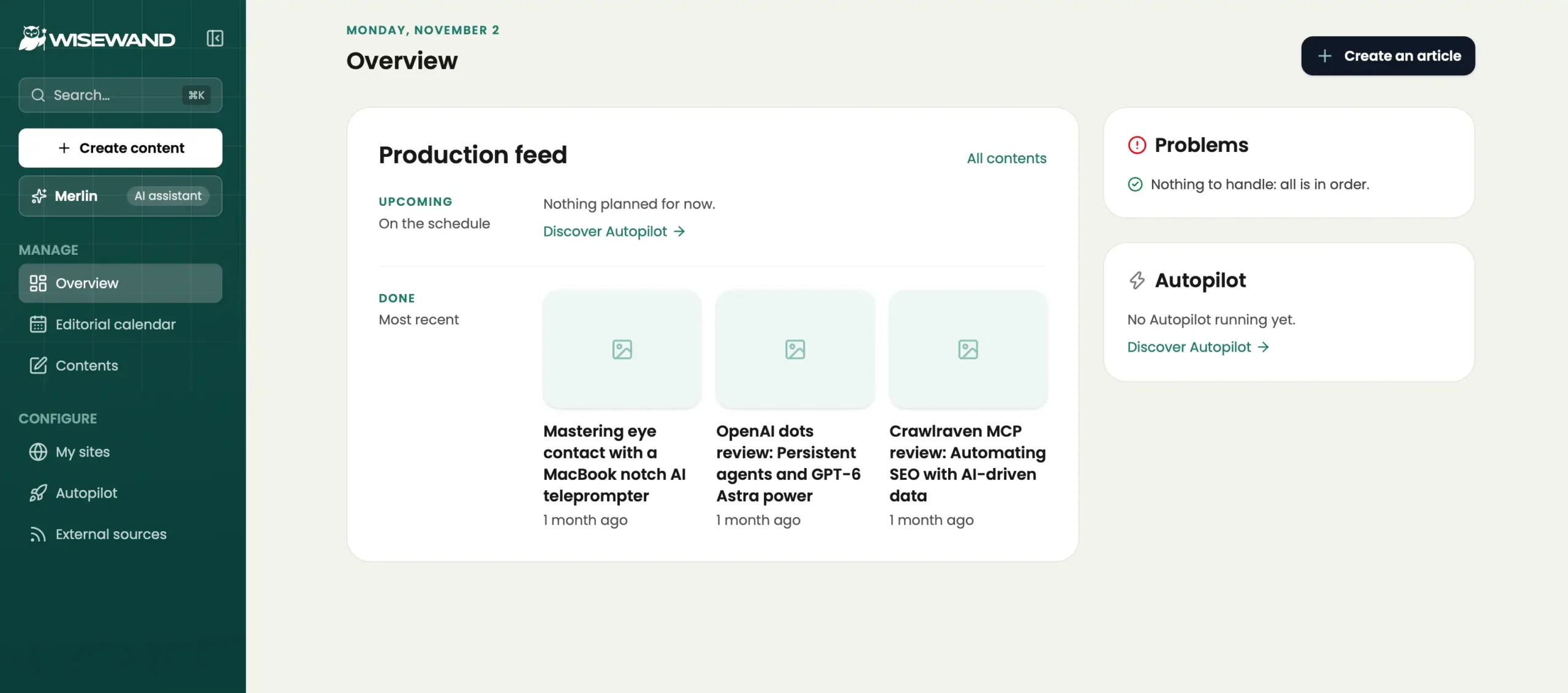
Wisewand is an AI content platform built for SEO articles, affiliate pages and e-commerce content. Instead of generating a block of text and leaving the rest to you, it handles research, outline, writing, images and publishing in one environment.
That matters if you’re used to bouncing between a chatbot, search results, an image tool and WordPress. Wisewand puts those steps in one place, which is where most of the time saving comes from.
What types of content can it create?
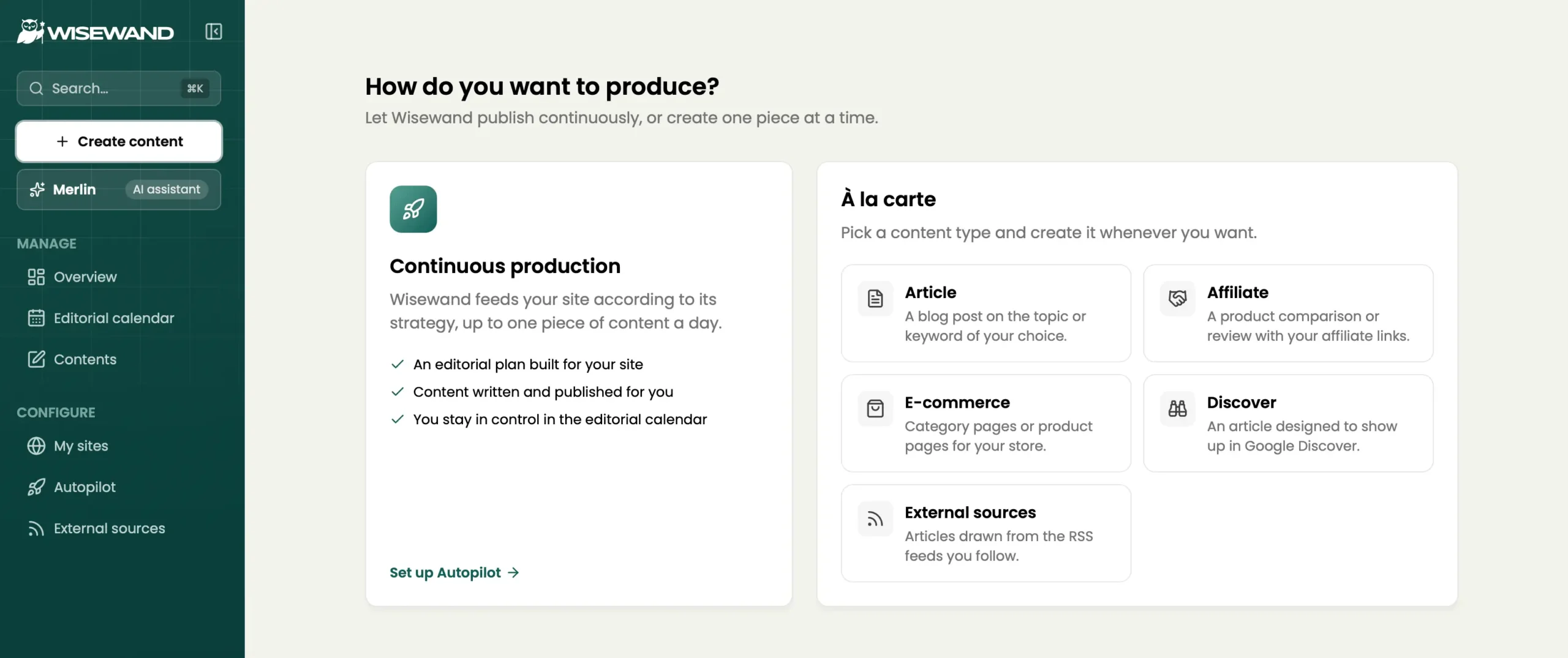
- Blog articles: complete SEO articles from a topic or keyword, including news-style posts.
- Affiliate pages: product reviews and product comparisons.
- E-commerce content: product pages and category pages.
- Google Discover articles: short articles written for Discover.
You choose both the language and the target country for each article. Wisewand writes in more than 100 languages and covers over 130 countries, and it generates natively in the language you pick rather than translating.
Who is Wisewand for?
- publish SEO articles regularly and want a predictable cost per article;
- run an affiliate site with reviews and comparisons;
- manage an online store and need product or category pages at scale;
- publish in several languages or for several countries;
- want scheduled publishing without managing a calendar by hand.
- publish a few posts a quarter;
- need a general assistant for emails, research and brainstorming too;
- publish on Webflow or Ghost and want a native integration;
- expect finished articles with no review, especially in sensitive topics.
How does Wisewand work?
The workflow runs in six steps, and you stay in control of most of them.
- Choose a content type. Article, affiliate page, e-commerce content or Discover, created one at a time or through Autopilot.
- Enter your topic and target. Pick the keyword, the language and the country.
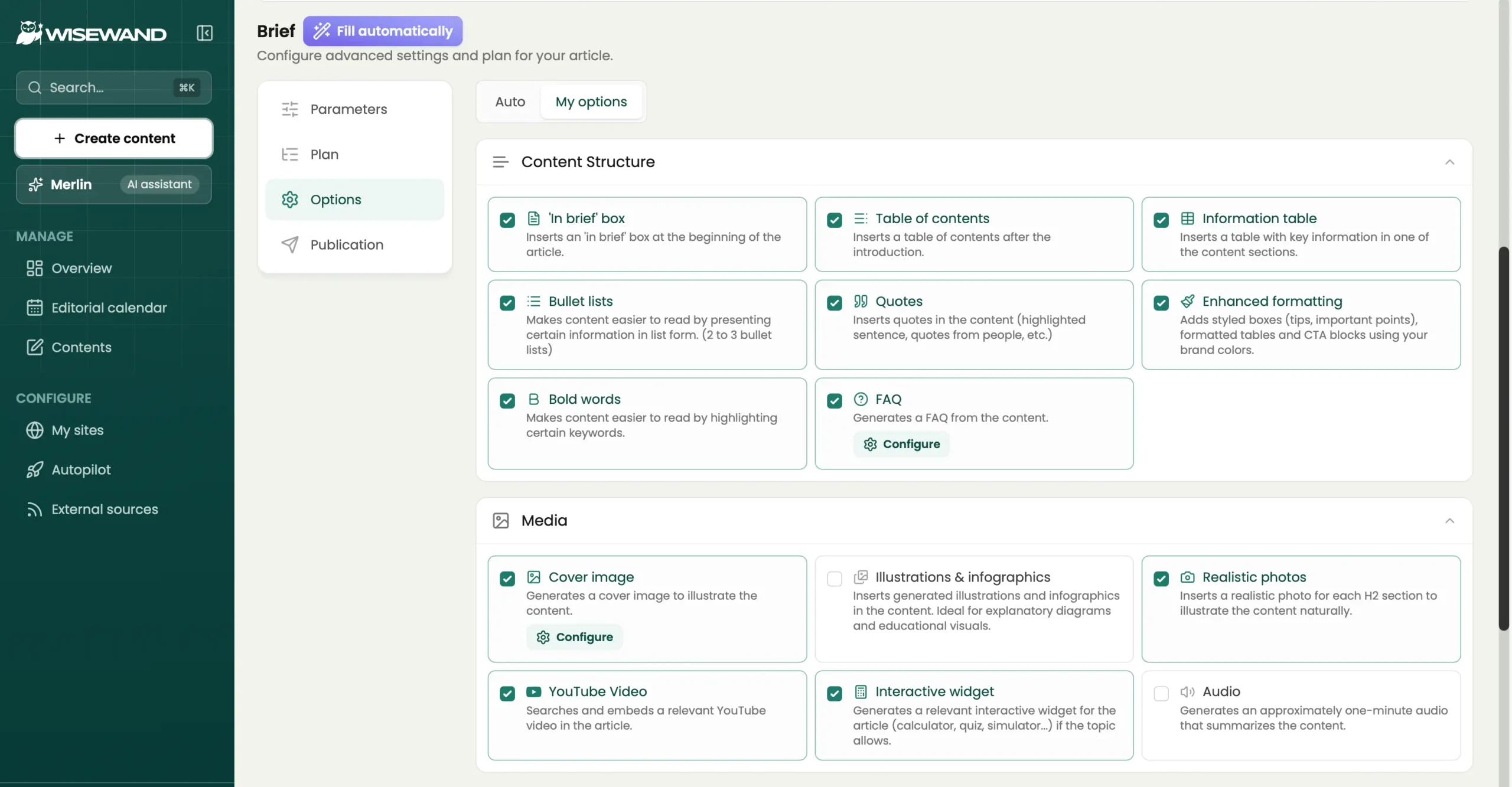
- Review the outline. You can set the number of H2 and H3 headings and edit each section’s title and intended content before any writing happens.
- Generate. A full article takes roughly 8 to 20 minutes, depending on length and topic.
- Check the draft. Each piece gets an SEO score with concrete recommendations. Your own review comes on top of that: facts, tone, real experience.
- Publish. Push it to WordPress, Shopify, WooCommerce, PrestaShop or a webhook. Wisewand triggers Google indexing automatically after publishing.
Don’t switch everything to automatic on day one. Read the first articles closely, adjust the outline settings to your taste, and only then let the schedule run.
Key features
A rebuilt generation pipeline
Wisewand says its latest version (V3) rebuilt the article engine around four steps: sourcing information from the web, building a writing plan tailored to the topic, writing and formatting automatically, and running quality checks while the article is being written. That’s the company’s description of its process. The practical test is simple: read a few drafts and see how much editing they need.
Research from the pages that already rank
Wisewand analyzes top-ranking pages and works their keywords, titles and data into your content. It also says it collects verified statistics, studies and figures rather than inventing them.
That’s Wisewand’s own description, so treat it as a promise to check, not a guarantee. Every number that ends up in a published article deserves a quick source check.
Editable outline and semantic optimization
The outline step is more useful than it sounds. Choosing how many sections an article gets, and rewriting what each one should cover, is where you steer an article toward your reader instead of toward the average of the first page of Google. On top of that, the AI adds keyword variations, synonyms and related entities.
SEO score and internal linking
Every article gets an SEO score with specific improvement suggestions. Wisewand also adds relevant internal links, built to support topic clusters, which saves a tedious job if you publish in volume.
Images, tables and extras
Images are AI-generated, up to 4K, with file names and alt text created automatically. Articles can include comparison tables and infographics, and where it makes sense, calculators, quizzes or simulators tied to the topic. Audio summaries and social media posts are included in every plan.
For software reviews, I’d still swap in real screenshots of the product. Readers want to see the actual interface, not a decorative illustration.
Personas and tone
Wisewand says it adapts to your tone, branding and personas, and custom personas come with every plan. How closely the result matches your voice depends on what you feed it, which is worth testing on your first few articles.
Autopilot
Autopilot picks topics, keeps a rolling 30-day editorial calendar and publishes about one article a day to your site. It’s included in every plan. The ceiling depends on the plan: up to one article a day on Starter, and up to 15 a day per project on Pro. With Shopify, Autopilot publishes a daily article built from your product pages.
This suits a site with a clear editorial strategy. It’s a risk for a site without one, because a tool that can publish daily will happily fill your blog with articles nobody needed. I’d rather publish fewer, better-edited pages.
Bulk generation
If you’d rather stay hands-on, you can queue several articles and schedule their publication. Product and category pages can be generated one at a time, in bulk or from an imported file, starting from your topic or from a competitor URL used as the only source.
API, MCP and automation tools
Wisewand offers a public REST API, a command-line tool and an official MCP server. MCP (Model Context Protocol) is a standard that lets an AI assistant use outside tools, and Wisewand’s server works with Claude Code, Claude Desktop, Cursor, VS Code and Windsurf. There are also ready-made n8n workflows and a Make module. For plain article writing you don’t need any of it.
Merlin, the AI SEO assistant
Merlin is the assistant you talk to inside Wisewand, and the company positions it as a personal SEO consultant. According to Wisewand’s announcement, it can audit your site by connecting to your Google Search Console, identify keyword and topic opportunities, write articles, schedule their publication and track your metrics. On the website, Merlin also greets new visitors: you give it your site address and it prepares a first article in a few minutes.
Those are Wisewand’s own descriptions. The sensible way to judge Merlin is to connect Search Console, ask for content opportunities and compare its suggestions with what you already see in your own data. A list of generic keywords tells you much less.
Wisewand for SEO and GEO
Wisewand writes articles in a structure that suits both search engines and AI answer engines: a direct answer at the start of each section, clear headings, question-and-answer blocks with Schema.org markup, internal links and meta tags. It can’t promise rankings or citations, and Wisewand itself says so.
SEO and GEO in plain terms
SEO (search engine optimization) is about ranking in a list of links on Google. GEO (generative engine optimization) is about being used and quoted in the written answers of tools like ChatGPT, Perplexity and Google AI Overviews. The two overlap heavily: both reward accurate, sourced, well-structured content that makes sense even when lifted out of context.
What Wisewand does for GEO
- Opens sections with a direct answer.
- Builds ranked headings and Q&A blocks.
- Adds Schema.org markup for FAQ content.
- Generates meta titles and descriptions.
- Links related articles together.
Wisewand states that no tool can guarantee a ChatGPT citation, an AI Overview spot or a Google rank, and that results depend on your market, your site’s authority and your competitors. That’s the right way to see it. Software can produce well-organized pages; the authority and original insight have to come from you.
Wisewand pricing: plans, credits and value
For solo publishers, the relevant Wisewand plans are Starter at €67 per month (30 articles, one site) and Pro at €147 per month (90 articles, unlimited sites). Prices exclude VAT.
| Plan | Monthly price | Yearly price | Credits per month | Sites | Autopilot pace |
|---|---|---|---|---|---|
| Starter | €67 | €670 | 30 | 1 | Up to 1 article a day |
| Pro | €147 | €1,470 | 90 | Unlimited | Up to 15 articles a day per project |
Prices exclude VAT. Yearly billing is listed as two months free.
Black Friday: the prices above are the regular prices. The 25% offer with code BLACKFRIDAY is described at the top of this page.
Check Current Wisewand Plans →
What does one article cost?
One credit equals one complete article, images included, with no extra charge for options. Divide the monthly price by the credits and you get about €2.23 per article on Starter (€67 for 30) and about €1.63 on Pro (€147 for 90). On yearly billing the effective monthly price drops to around €56 for Starter and €122 for Pro.
Subscribers can also buy extra credits at their plan’s rate, and the unit price falls as the volume goes up.
Do credits expire?
No. Unused credits roll over from month to month with no expiry date, so there’s no pressure to burn through an allowance before the month ends. On what happens if you cancel, Wisewand’s FAQ says credits you’ve already acquired stay available, and that matched my own experience: when I cancelled an earlier subscription, my remaining credits were still in my account. Its launch announcement, however, words the rollover as “as long as your subscription is active”, so if this matters to you, confirm the terms of the current plans before subscribing.
Can you cancel or change plan?
Yes. You can cancel at any time, and no long-term commitment is required. An upgrade takes effect immediately, and a downgrade takes effect at the end of the billing cycle.
Is there a trial?
Wisewand has offered a 3-day trial for €1 rather than a free plan. The Autopilot trial includes 3 credits and is limited to one per customer, and it moves onto a paid plan automatically afterwards. Read the price and conditions shown at checkout before you start, because trial terms can differ from the standard plan prices.
Which plan should you choose?
Starter: one site, up to 30 articles a month. A sensible starting point for a solo publisher with a single content site.
Pro: for publishers who run several sites, or who need 90 articles a month and a faster Autopilot pace.
The cheapest cost per article isn’t the best plan. The best plan matches the number of useful articles you can realistically review and maintain.
My experience with Wisewand
I’ve used Wisewand on real content production, including affiliate-oriented articles. The biggest benefit was the time saved between picking a topic and getting a usable, structured draft. I didn’t have to build every outline and section by hand, so I started editing from a much more complete base.
What worked well
The search-informed structure was useful for informational articles and product reviews. The affiliate formats were another strength: having dedicated formats for reviews and comparisons cut the repetitive setup. And publishing straight from the same place beat generating text in a chatbot and moving everything into WordPress by hand.
What still needed work
Drafts always needed human editing. I had to check claims, improve phrasing and make sure the article reflected real experience instead of generic product descriptions. That matters most for comparisons, where readers expect accurate information, honest limitations and a clear recommendation, not just a polished page.
How to judge it yourself in an afternoon
- Pick a topic you know well. You’ll spot errors faster.
- Generate one article. Edit the outline first instead of accepting the default.
- Time your edit. Note how long fact-checking and rewriting take.
- Compare with your usual process. If the total is clearly lower, the subscription pays off.
Wisewand vs alternatives
| Tool | Best for | Main trade-off |
|---|---|---|
| Wisewand | Regular SEO and affiliate publishing, billed per article | Recurring cost, drafts need review |
| Koala AI | Amazon affiliate content and brand-aware articles, from $25/month | Word allowance and model multipliers to track |
| ChatGPT or Claude | Flexible writing, research and editing for many tasks | You build the research and publishing workflow yourself |
Wisewand vs Koala AI
Wisewand charges per article and includes Autopilot in every plan. Koala AI charges a word allowance, adds Brand DNA and an SEO agent connected to Search Console, and has a dedicated Amazon workflow. See the full Wisewand vs Koala AI comparison or read our Koala AI review.
Wisewand vs ChatGPT or Claude
General assistants are more flexible, but you organize the research, images and publishing yourself. The two aren’t exclusive: Wisewand’s MCP server lets you drive it from Claude Desktop or Claude Code. For more options, see our guide to the best AI writers for SEO.
Final verdict: should you try Wisewand?
Wisewand is a solid choice for solo publishers who produce SEO or affiliate content every week and want one tool for research, drafting and publishing. Credits that never expire and an Autopilot included from the first plan make it easy to budget and to automate.
It isn’t for everyone. If you publish occasionally, the subscription is hard to justify, and if your platform is Webflow or Ghost you’ll need the webhook or API route. Whatever you choose, plan to review every article before it goes live.
Want to see whether Wisewand fits your workflow?
Check the current plans and run one article on a topic you know well.
Affiliate link. I may receive a commission if you purchase, at no additional cost to you.
Frequently asked questions about Wisewand
What is Wisewand?
Wisewand is an AI content platform for SEO articles, affiliate pages and e-commerce content. It analyzes top-ranking pages, writes the article, adds images and can publish it to WordPress, Shopify, WooCommerce or PrestaShop.
Is Wisewand worth the money?
It’s worth it for publishers who put out SEO or affiliate articles regularly, since one credit buys one article and the workflow replaces several tools. For occasional publishers a subscription is harder to justify.
How much does Wisewand cost?
Starter costs €67 per month for 30 articles on one site, and Pro costs €147 per month for 90 articles on unlimited sites. Prices exclude VAT, and yearly billing includes two months free. Check the official page for current prices.
Does Wisewand have a free trial?
Wisewand has offered a 3-day trial for €1 instead of a free plan. Read the conditions at checkout, because the Autopilot trial moves onto a paid plan automatically.
Do Wisewand credits expire?
No. Unused credits roll over every month with no expiry date. Wisewand’s FAQ says acquired credits also stay available after cancellation, and my remaining credits were still there after I cancelled an earlier subscription. Its announcement ties the rollover to an active subscription, so check the current terms if that matters to you.
What does one Wisewand credit get you?
One credit corresponds to one complete article, images included, with no extra charge for options.
What is Wisewand Autopilot?
Autopilot picks topics, keeps a rolling 30-day editorial calendar and publishes about one article a day to your site. It’s included in every plan, with a cap of one article a day on Starter and up to 15 a day per project on Pro.
What does Merlin do in Wisewand?
Merlin is Wisewand’s AI assistant. Wisewand says it can audit your site through Google Search Console, find keyword opportunities, write and schedule articles and track your metrics. On the website it also prepares a first article from your site address.
Which platforms can Wisewand publish to?
Natively to WordPress, Shopify, WooCommerce and PrestaShop. Other platforms can be reached through a webhook, the REST API, n8n workflows or a Make module.
Can Wisewand help with SEO and GEO?
It writes in a structure that suits both: direct answers at the start of sections, clear headings, Q&A blocks with Schema.org markup and internal links. Wisewand itself states that no tool can guarantee Google rankings or citations in ChatGPT, Perplexity or AI Overviews.
Does Wisewand support MCP?
Yes. Wisewand has an official MCP server that works with Claude Code, Claude Desktop, Cursor, VS Code and Windsurf. You don’t need it to write articles.
Which languages does Wisewand write in?
More than 100 languages, with more than 130 countries to target. You choose the language and the country for each article.
Is Wisewand good for affiliate websites?
It has dedicated formats for affiliate pages, product reviews and comparisons, which cut the repetitive setup. Product testing, fact-checking and honest recommendations remain your job.
How long does Wisewand take to write an article?
Wisewand states that a full article takes about 8 to 20 minutes, depending on length and topic.
Does Wisewand content pass AI detection?
Wisewand claims its text passes AI-detection tests. That’s a marketing claim, and detectors are unreliable in both directions, so judge the article on whether it’s accurate, useful and edited by a human.
Does Wisewand have a discount code?
Wisewand has advertised limited-time offers on its pricing page, and they change. Check the current pricing page before you subscribe, since any discount applies only while it’s listed.
Is Wisewand better than ChatGPT?
They do different jobs. ChatGPT is a general-purpose assistant. Wisewand is built for producing and publishing SEO articles, so it fits better when you publish regularly and want the whole workflow in one place.
More in this category: browse all AI writing tool reviews.
Last checked: November 2, 2026. Prices and plan conditions may change.
This article contains affiliate links. We may earn a commission if you purchase through our links, at no extra cost to you. Our hands-on experience with Wisewand informs this review. Opinions are our own.